Skip to content

Monthly QuickBooks review for accounting firms

Every client's books, reviewed before you open them.

BetterFinanceView reads each client's QuickBooks Online every month and marks up what needs your attention: duplicates, miscoded and uncategorized transactions, and edits to periods you already closed. You review the exceptions, not the whole ledger.

READ ONLYWe never change QuickBooks. BetterFinanceView can only read your clients' books. You can disconnect a client at any time.

General ledger scan · June 2026

Client: Acme Outdoor Supply LLC (example)
Source: QuickBooks Online, read-only

W/P B-4
Vendor / accountAmountMark
06/02Crestline PropertiesRentEdited July 1, after June closed1,200.00C
06/03Rivertown Office SupplyOffice Supplies482.00✓
06/04Rivertown Office SupplyOffice SuppliesSame vendor and amount, one day apart482.00D
06/09Meridian Freight Co.Uncategorized ExpenseUncategorized. Suggested: Freight & Delivery1,150.00U
06/12Skyline Business InsuranceMiscellaneousUsually coded to Insurance Expense640.00M
06/16Delta Fuel & FleetAuto Expense214.37✓
4 exceptions · 2 high3,472.00✓
Prepared byBetterFinanceView · 07/02/26
Reviewed by

What we check

15 problems we look for every month.

Every month we check each client's transactions against simple rules and the client's own history, then look over the balance sheet. Each problem gets a mark, a priority, and the dollar amount, so you can work through the month in minutes.

Transactions

D

Duplicate transactions

Same amount and vendor appearing more than once in a period.

high
U

Uncategorized

Sitting in Ask My Accountant or an uncategorized account.

high
M

Miscategorized

Coded to an account this vendor doesn't usually go to.

medium
C

Closed period edited

Dated in a month that has ended, then changed after that month closed.

medium
R↓

Revenue drop

Revenue down more than 30% from the prior period on the P&L.

medium
S↑

Spending spike

A category at more than twice its average monthly spend over the prior three months. High severity above three times.

medium
N

New high-value vendor

A first-time vendor with more than $2,000 of spend this period.

medium
○

Round number

Round-dollar entries that may be estimates or placeholders.

low

Balance sheet

OB

Opening Balance Equity left over

A setup balance that was never moved to its proper account.

medium
UF

Payments stuck in Undeposited Funds

Customer payments recorded but never matched to a bank deposit for more than 30 days.

medium
SU

Money in a suspense account

A balance parked until someone decides where it belongs.

medium
±

Backwards balances

A negative bank balance (medium), or a card, receivables or payables on the wrong side (low).

medium
P

Payroll liabilities not clearing

Payroll taxes owed that don't go down from one month end to the next.

medium
L=

Loan balances that never move

The same loan balance three month ends running: payments may be booked as expense.

medium
B

Old uncleared bank items

Bank or card transactions more than 60 days old that still haven’t cleared.

medium

How a month runs

We prepare. You review. Your firm signs.

Connecting a client takes about two minutes. After that the review runs on its own every month, and nothing changes in the books unless you change it.
Prepared byBFV

Books read and marked

We check every connected client each month. For many problems we also suggest the right account. We never change anything for you.

Reviewed byYou

Biggest problems first

Fix the high-priority items first, in QuickBooks, and mark them done here. Your Monday email lists which clients need you that week.

Sent byYour firm

A review under your name

Send a PDF or a secure link with your logo and colour. Links stop working after 90 days, and you can turn one off at any time.

Every Monday

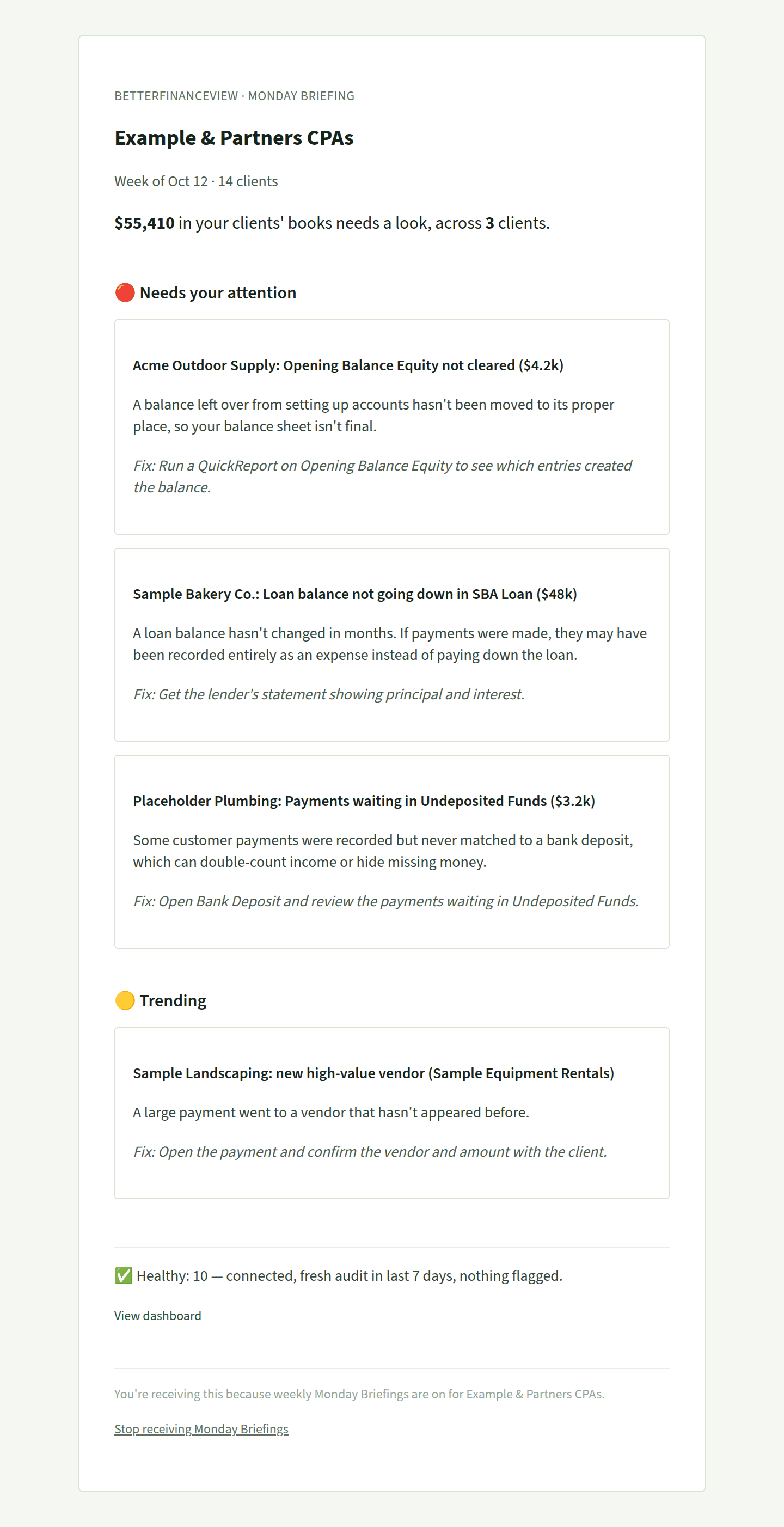
One email a week. Only what needs you.

The total that needs a look across every client, then the most important items, each with what's wrong, why it matters, and the first step to fix it. Clean books stay off the list. No dashboard to check.

See the full sample email
Sample Monday email for a fictional firm: $55,410 needs a look across 3 clients, then each item with a fix step
A sample briefing for a fictional firm.

Client reports

The review goes out on your letterhead, not ours.

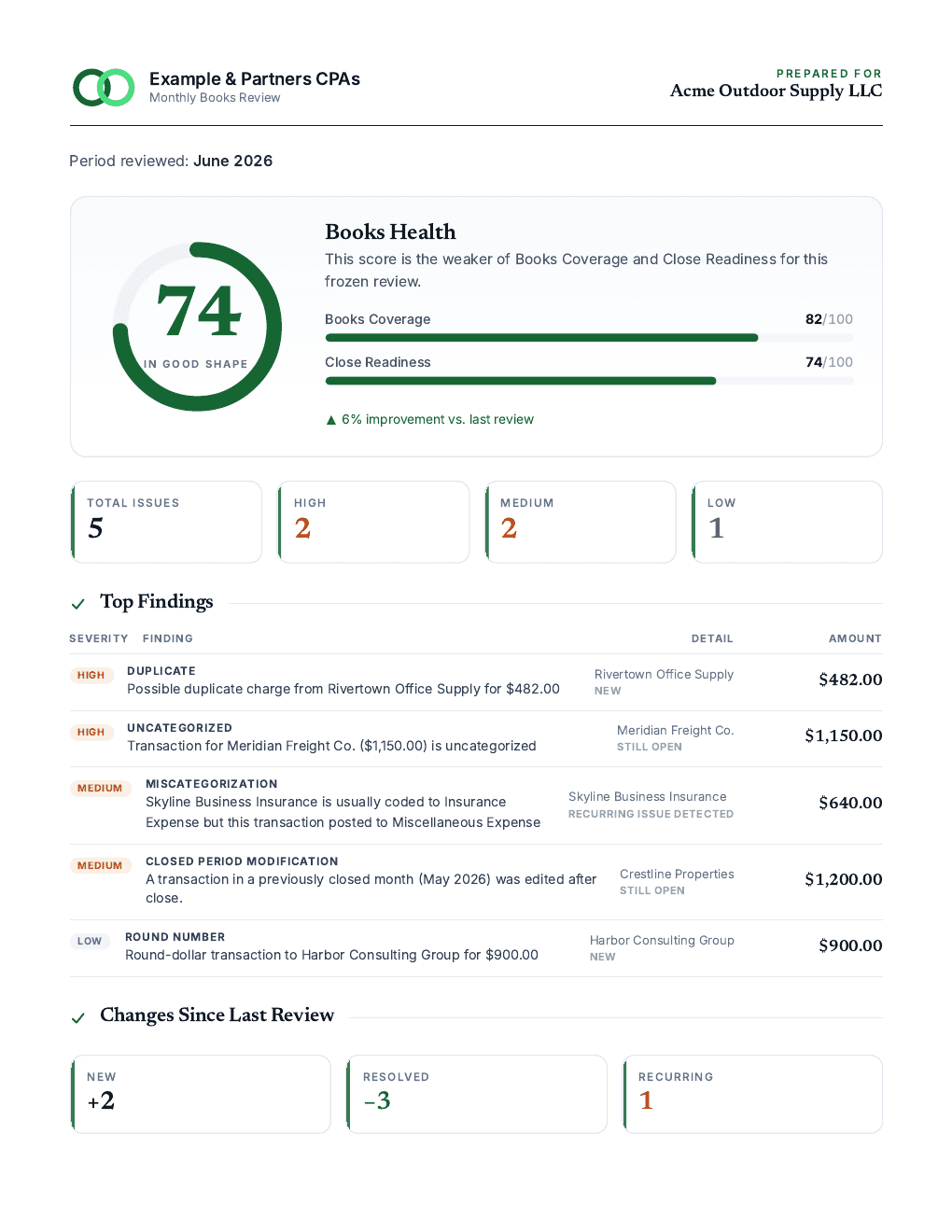
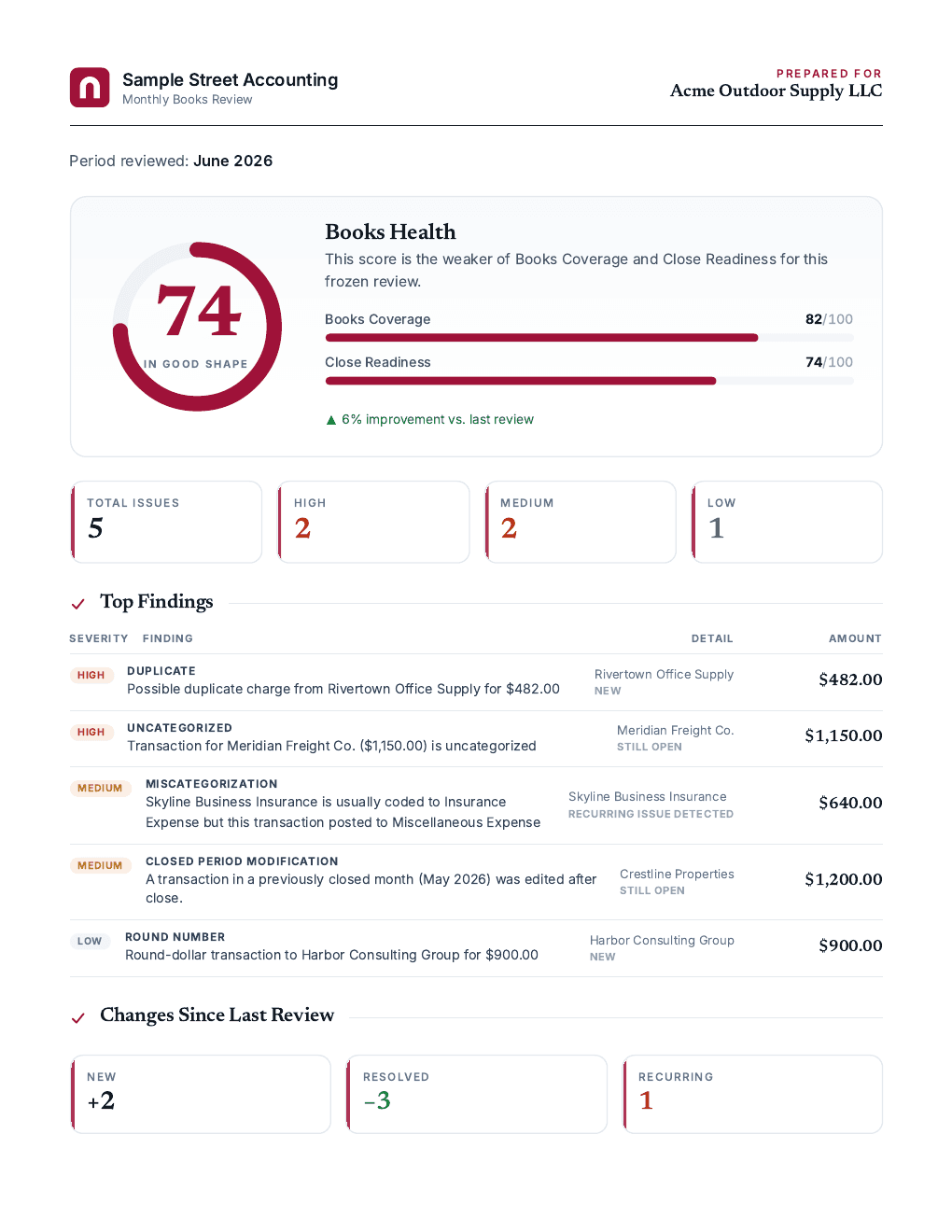
Your client sees your logo, a books health score, the top findings with amounts, and what changed since last month. BetterFinanceView's name appears nowhere on it.

  • Your logo, colour, and footer on every report
  • Shareable link, no login needed for the client
  • Stays exactly as it was when you created it
  • PDF download included on every plan
Firm colour

Example & Partners CPAs

Monthly Books Review · June 2026

PREPARED FOR

Acme Outdoor Supply LLC

74
Books coverage82
Close readiness74
FINDINGAMOUNT
HIGHPossible duplicate, Rivertown Office Supply$482.00
HIGHUncategorized, Meridian Freight Co.$1,150.00
MEDClosed month edited, Crestline Properties$1,200.00

Example & Partners CPAs. Confidential, prepared for our client.
Type your firm's name and pick a colour. This is the header your clients will see.

Scope of access

We read the general ledger. We have no way to change it.

What we read

  • Expenses, bills, checks, deposits, journal entries
  • Chart of accounts
  • Profit and loss reports

What we never do

  • Create, edit, or delete anything in QuickBooks
  • Read payroll or customer payment details
  • Sell data or use it to train AI models

We never change QuickBooks.

HowBetterFinanceView can only read QuickBooks. Nothing in it can create, change, or delete anything there.

Your controlDisconnect a client from BetterFinanceView or from QuickBooks at any time.

Your firm's data stays yours.

HowEach firm's data is walled off inside the database itself, so one firm can never see another's, even if the app had a bug.

Your controlOwner, Admin, Reviewer, and View-only roles.

Connections are locked down.

HowYour QuickBooks connections are stored encrypted, and we never see a QuickBooks password.

Your controlIf a connection stops working, we flag it in the app so you can reconnect.

AI sees only what each job needs.

HowFor some flagged items, Claude (Anthropic's AI) gets the details it needs to suggest the right account or explain a spending jump: the date, vendor, amount, and accounts involved, but not your client's name. To write your Monday email, it does see each client's name and the facts behind each item.

Your controlSuggestions are never applied for you. Your data is not used to train AI models.

Full details, including what we store and how we handle QuickBooks Desktop files, are on the security page.

Who's behind it

The people behind the review.

A note from the founder, and what early-access firms have told us.

A note from the founder

Placeholder

I spent twelve years running monthly closes for small-business clients. The work that kept me up in March was never the hard judgment calls. It was the duplicate bill nobody caught in July, or the rent payment someone re-dated after we had closed the month.

BetterFinanceView does the first pass I used to do by hand, for every client, every month. It only reads the books, because I would never give a tool write access to a client’s ledger, and I don’t expect you to either.

Jordan Ellis, CPA

Founder, BetterFinanceView

  • CPA, licensed in Ohio
  • QuickBooks Online ProAdvisor
  • 12 years in client accounting services
“We found a $4,200 duplicate vendor payment in the first week. The client had no idea.”
Dana Whitfield, Managing partner, Whitfield & Moore CPAs38 clientsPlaceholder
“Monday mornings used to be me opening 25 QuickBooks files. Now I open one email and know where to start.”
Marcus Oyelaran, CAS lead, Northgate Advisory61 clientsPlaceholder
“Read-only was the deciding factor. I can explain that to a client in one sentence.”
Priya Raman, EA, Owner, Raman Bookkeeping14 clientsPlaceholder

Pricing

Priced by the firm, not by the client.

Your first 10 clients are free. After that, one flat price for the whole firm. Every plan includes unlimited team members.
  • Free

    $0

    Up to 10 clients· Start here

    Up to 10 clients, no credit card · Monthly review of every client · Weekly Monday email with only what needs you

  • Practice

    $99/mo

    Up to 100 clients

    One flat price for up to 100 clients · Unlimited team members

  • Growth

    $149/mo

    Unlimited clients

    Unlimited clients · Help getting your firm set up

BETAEvery plan is free during early access. We'll tell beta firms well before any pricing change.

Win more clients without a per-client bill.

Per-client review tools charge more every time your firm grows. BetterFinanceView charges by tier.

40
BetterFinanceView Practice$99/mo
Per-client tool at $10 a client$400/mo
Per-client tool at $50 a client$2,000/mo

Plans: Free $0 up to 10, Practice $99 up to 100, Growth $149 unlimited. Every plan is free during beta.

Questions

Common questions.

Does BetterFinanceView write anything to QuickBooks?

No. BetterFinanceView can only read your clients' books. Nothing in it can create, change, or delete anything in QuickBooks.

How is my clients' financial data protected?

Each firm's data is walled off from every other firm's, and your QuickBooks connections are stored encrypted. We keep the problems we find and summary figures for your reports, not a copy of your clients' QuickBooks Online transactions.

Does it replace Karbon, TaxDome, or Financial Cents?

No. Those tools run your to-do lists and client communication. BetterFinanceView looks inside the books and tells you what needs fixing.

Does the AI change anything on its own?

No. For some flagged items, Claude (Anthropic's AI) suggests the right account and says how sure it is. You decide whether to use it, and you make any change in QuickBooks yourself.

What QuickBooks data do you read?

Transactions (expenses, bills, checks, deposits, journal entries), the chart of accounts, and profit and loss reports. Not payroll, not customer payment details, and nothing outside the general ledger.

Can my whole team use it?

Yes. Invite people as Owner, Admin, Reviewer, or View-only. Reviewers work issues; view-only members can read reports and dashboards but can't change anything.

Is this in beta?

Yes. Early-access firms use every plan free in exchange for feedback. Features may change, and we'll give beta firms plenty of notice before any pricing change.

Hand next month's first pass to us.

Create your account, connect one client, and see what we find. Free during beta, no credit card.

Create your free account